A DOS gaming simulator for iPhone & iPad

Classic DOS games,
pocket sized.

DOS Simulator turns your own DOS game collection into a polished touch-first library. Import an archive or folder, and the app identifies the cover, the launch file, and the game info — then it just plays.

Available exclusively on the App Store · Requires iOS 16 or later · iPhone & iPad

DOS Simulator on iPad showing a game library with cover art, launch-file detection, and a game detail panel
Import & playCovers, launch files & info detected
Instant savesQuick, exit & manual slots
3 control modesGamepad, keyboard & mouse
Private by designYour games stay on your device

Bring your own classics

The DOS games you already own, minus the setup.

DOS Simulator is made for people who still love the golden age of MS-DOS gaming — RPGs, strategy games, adventures, and action titles. Add a game archive or folder from the Files app, iCloud Drive, or a connected cloud drive, and DOS Simulator matches it against a built-in launch database covering thousands of classic DOS titles.

It finds the right executable, attaches cover art and game information, and remembers your choices. When you tap play, the game starts — no configuration dialogs, no command lines, no typing paths on a touch screen.

Built around real DOS gaming

Everything a classic game needs.
Nothing it doesn't.

01

Import and play

Drop in a zip archive or a game folder. DOS Simulator automatically identifies the cover art, the launch file, and the game's name, genre, and year — then shows you exactly what it found before starting.

  • Automatic cover art and metadata
  • Launch-file detection with a built-in DOS game database
  • Manual override whenever you prefer your own choice

DOS Simulator library importing a DOS game and recognizing its cover, launch file, and game information
One import, everything recognized.
02

Instant saves

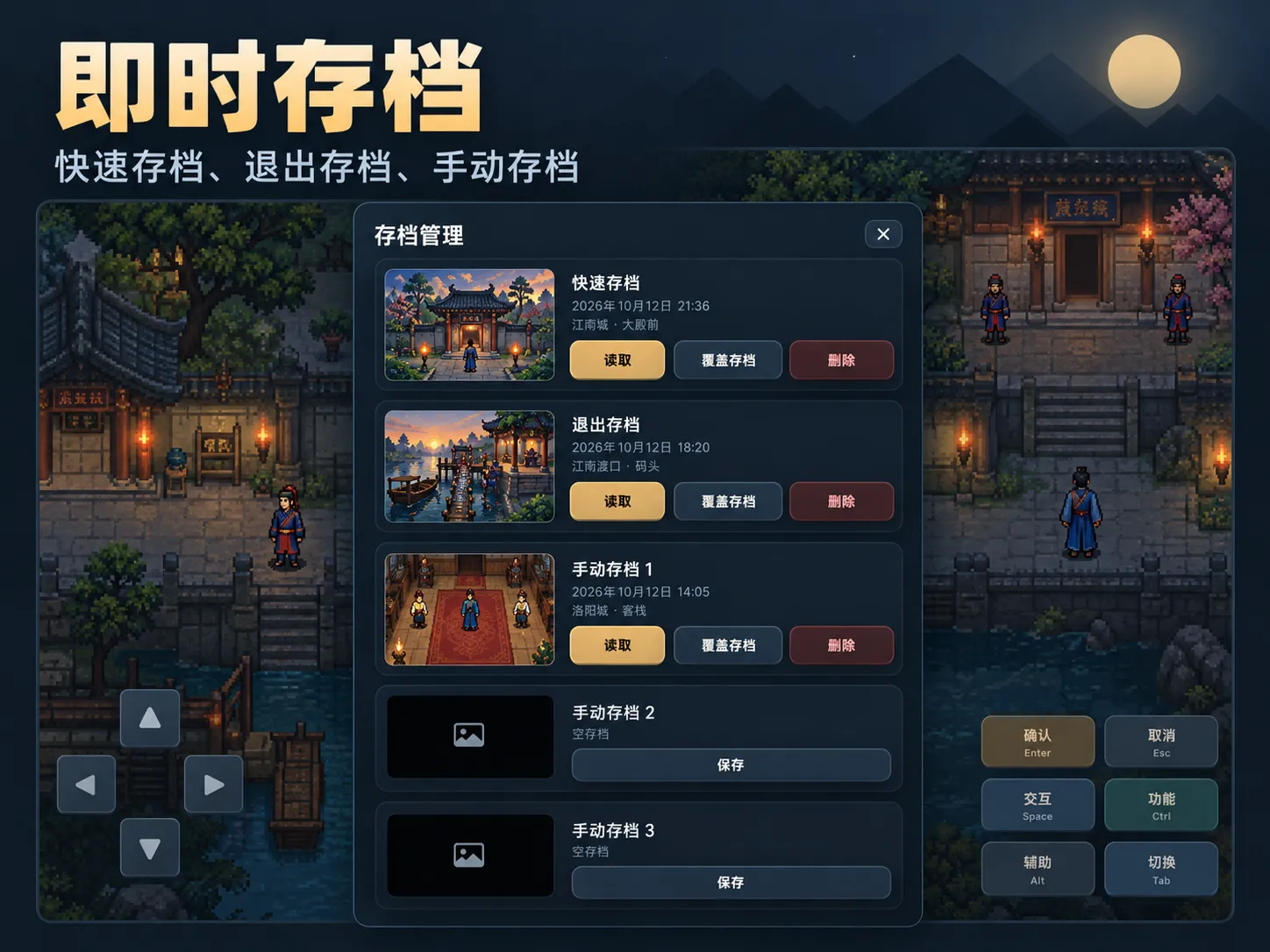
Classic games assume you can leave the machine running. DOS Simulator doesn't. Save your state at any moment with a quick save, capture an exit save when you close the game, and keep extra manual slots alongside them.

  • Quick save and exit save
  • Manual save slots with screenshots
  • Load any state in one tap
DOS Simulator save management screen listing quick save, exit save, and manual save slots with screenshots
Every slot shows exactly where you stood.
03

Gamepad, keyboard, or mouse

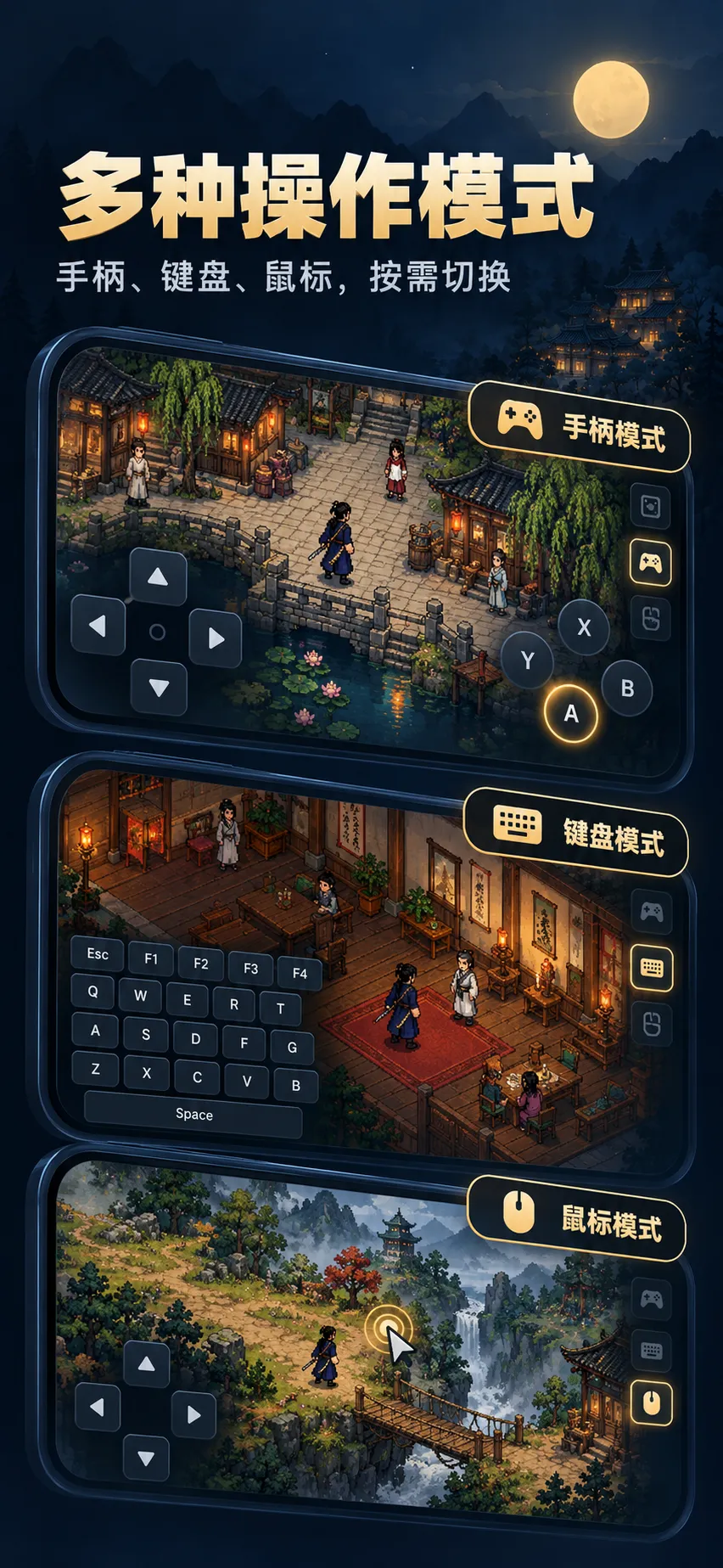
DOS games were built for keyboards and mice. DOS Simulator gives you three on-screen control modes — a virtual gamepad, a full keyboard, and a mouse mode — and you can switch between them per game, whenever the scene calls for it.

  • Virtual gamepad, keyboard, and mouse modes
  • Physical MFi game controller support
  • Switch modes without leaving the game
DOS Simulator showing gamepad mode, keyboard mode, and mouse mode stacked over DOS game scenes
Three ways to play, one tap apart.
04

Controls that fit the game

A role-playing game wants Confirm, Cancel, and menu shortcuts. A strategy game wants unit orders. An action game wants an analog stick and attack buttons. DOS Simulator ships dedicated button presets per genre, with auxiliary functions and one-tap switching.

  • Dedicated presets for RPG, strategy, and action games
  • Genre-specific shortcut keys and auxiliary actions
  • Switch presets any time, per game
DOS Simulator per-game button presets for role-playing, strategy, and action DOS games
Purpose-built layouts, not one-size-fits-all.
05

Portrait and landscape

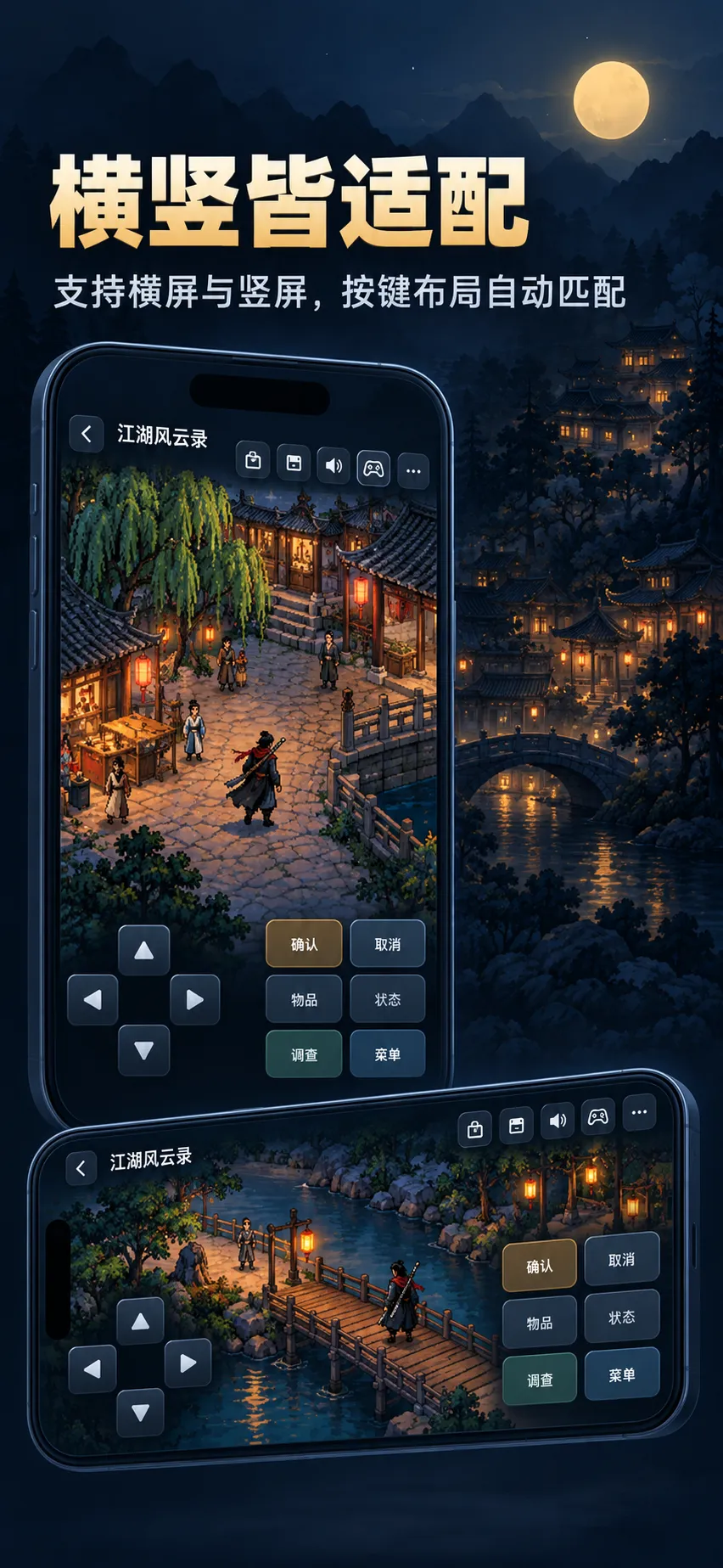
Hold your device however the game feels best. Both orientations are fully supported, and the button layout adapts automatically — controls reflow around the 4:3 game picture instead of fighting it.

  • Full portrait and landscape support
  • Button layouts adapt on rotation
  • The 4:3 game picture always takes the stage
DOS Simulator running a DOS game in portrait and landscape orientations with adaptive button layouts
Rotate freely — the controls follow.

Made for iPad too

The same library,
a much bigger window.

DOS Simulator save management on iPad with quick save, exit save, and manual slots beside a running DOS game
Save management next to a running game.
DOS Simulator on iPad offering gamepad, keyboard, and mouse modes for a DOS game
Gamepad, keyboard, and mouse — side by side.
DOS Simulator on iPad showing genre-specific button presets for RPG, strategy, and action DOS games
Genre presets with full-size keys.
DOS Simulator on iPad in portrait and landscape orientations with adaptive control layouts
Portrait or landscape, both first-class.

Local by default

Your games stay on your device.

DOS Simulator runs your games locally on your iPhone or iPad. It has no account system and does not include advertising, analytics, or tracking. Cloud-drive tokens you add for importing are stored in your device's Keychain.

Read the Privacy Policy

Common questions

About DOS Simulator

What is DOS Simulator?

DOS Simulator is a DOS gaming simulator for iPhone and iPad. It runs classic MS-DOS games that you import yourself, with a native library, automatic launch detection, instant saves, and touch-first controls.

How do I add my games?

Import a game archive or folder from the Files app, iCloud Drive, or a connected cloud drive. DOS Simulator automatically identifies the cover art, launch file, and game information, and you can always override its choice manually.

Does it come with games?

No. You bring your own legally obtained DOS games. A built-in launch database recognizes thousands of classic DOS titles and picks the right executable and disc setup automatically.

Can I save and resume my progress?

Yes. There is a quick save, an exit save, and additional manual slots — each with its own screenshot, so you can return to the exact moment you left.

Which controllers are supported?

Built-in virtual gamepad, keyboard, and mouse modes cover touch play, and physical MFi game controllers are supported too. Button presets adapt to the genre of the game you are playing.

Where can I get DOS Simulator?

DOS Simulator is distributed for iPhone and iPad exclusively through the App Store.

We are here to help

Support & Feedback

Need help with DOS Simulator?

If you have a question, found a bug, or would like to suggest a feature, you can contact us using the form below.

DOS Simulator app icon

Your classics. Your device.

Bring your DOS library back to life.

Download on the App Store